
How To Add or Remove a Blocked Sender

The following article contains instruction on how to block an unsafe message sender and remove an address from the block sender list.


How to Block A Sender:

1. Open the message of the sender you wish to block.
2. Within the ribbon, select the drop down arrow on the Junk button.
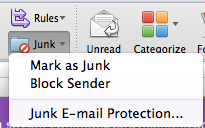


3. Select the option, Block Sender.
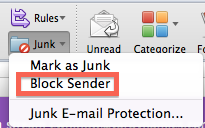


Note: An alternate way is to simply right click the message, Select Junk Mail and then Block the Sender.



How to remove an address that has been blocked:

1. Open your Outlook 2011 Client.
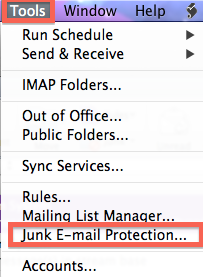
2. Along the navigation pane, select tools, then Junk E-mail Protection.


3. Click the Block Senders tab. 
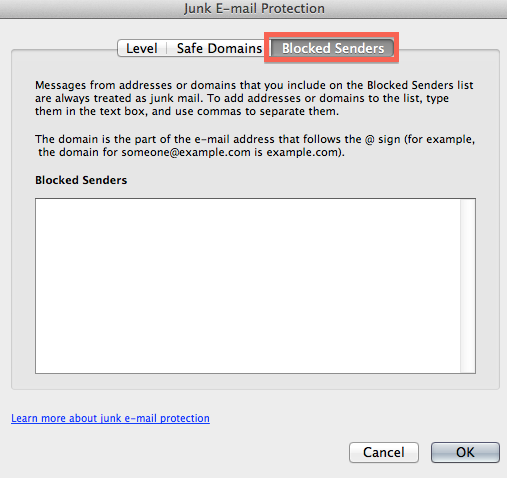


4. Locate the address you wish to unblock and remove the address.
5. Select OK when finished.

  • 0 utilizatori au considerat informația utilă
Răspunsul a fost util?

Articole similare

What's New For Outlook 2011

Wondering what's new in Outlook 2011 for the Mac. Provided is direct link to the Microsoft web...

System Requirements For Outlook 2011

Below are the system requirements for Outlook 2011 for Macintosh:   A Mac computer with an...

How to Check For Outlook 2011 Updates

Some performance issues can occur if your Outlook client is not up to date. The Microsoft...

How To Switch Identities in Outlook for Mac 2011

If multiple Identities are configured within Outlook 2011, the follow article will instruct you...

Accessing the GAL within Outlook 2011

To access the Global Address List within Outlook 2011, choose one of the following options: 1....